The blue line and the two lines of text beneath it decide whether people click on you or on your neighbour. How to write them.
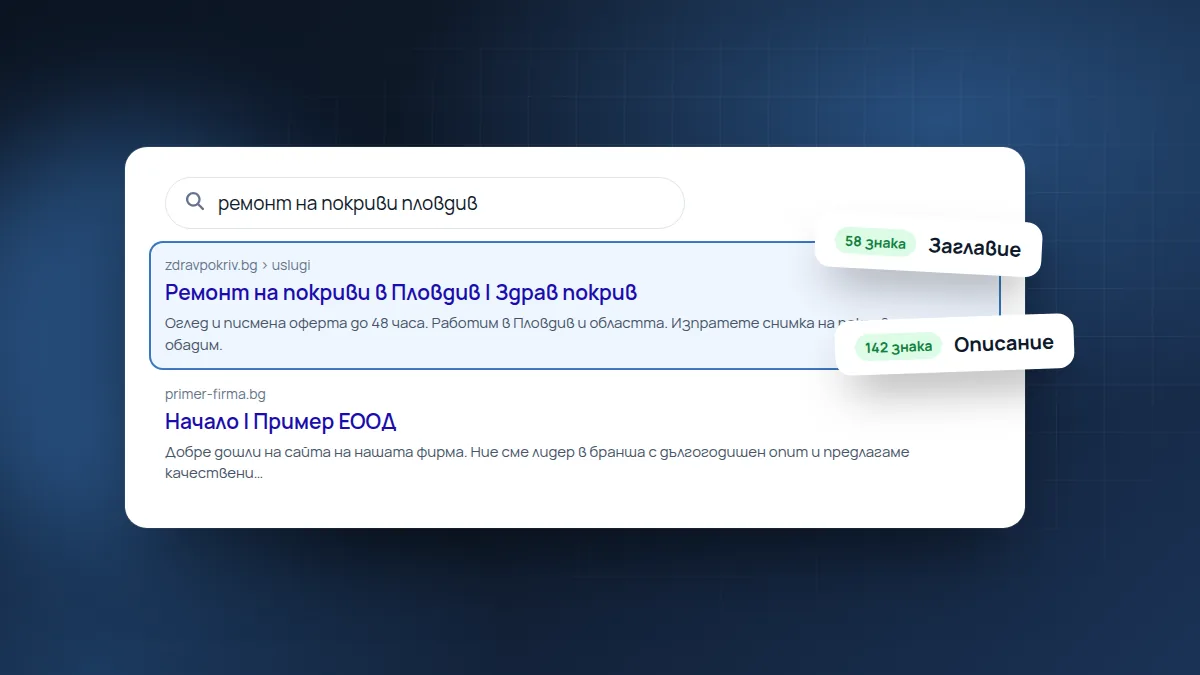
When your website appears in Google, people see three things: a blue title, an address and two lines of text. These are the meta title and the meta description. They aren’t visible on the page itself, but they decide whether anyone clicks.
Meta title
- About 50–60 characters. Google cuts anything longer with “…”.
- Start with what people search for: “Roof repairs in Plovdiv | Healthy Roof”, not “Home | Healthy Roof Ltd”.
- Every page has its own title. If all the pages are called “Home”, Google doesn’t know which one to show.
Meta description
- About 120–155 characters.
- Say what the person gets and what to do: “Site visit and quote within 48 hours. We work in Plovdiv and the surrounding area. Call us or send a photo of the roof.”
- Write for people, not for Google. Listing keywords doesn’t help and puts people off.
Google doesn’t always use your text
Sometimes Google picks an excerpt from the page itself if it decides it answers the search better. That’s normal. A well-written description, however, is shown more often and wins more clicks.
How to check yours
Type site:yourdomain.bg into Google. You’ll see all the pages Google knows about, with their titles and descriptions. Look for repetitions, “Home”, “Untitled” or text that is cut off in the middle.
Our free website check checks the title and description of your home page and tells you whether their length is right.
Found this article useful? Share it.