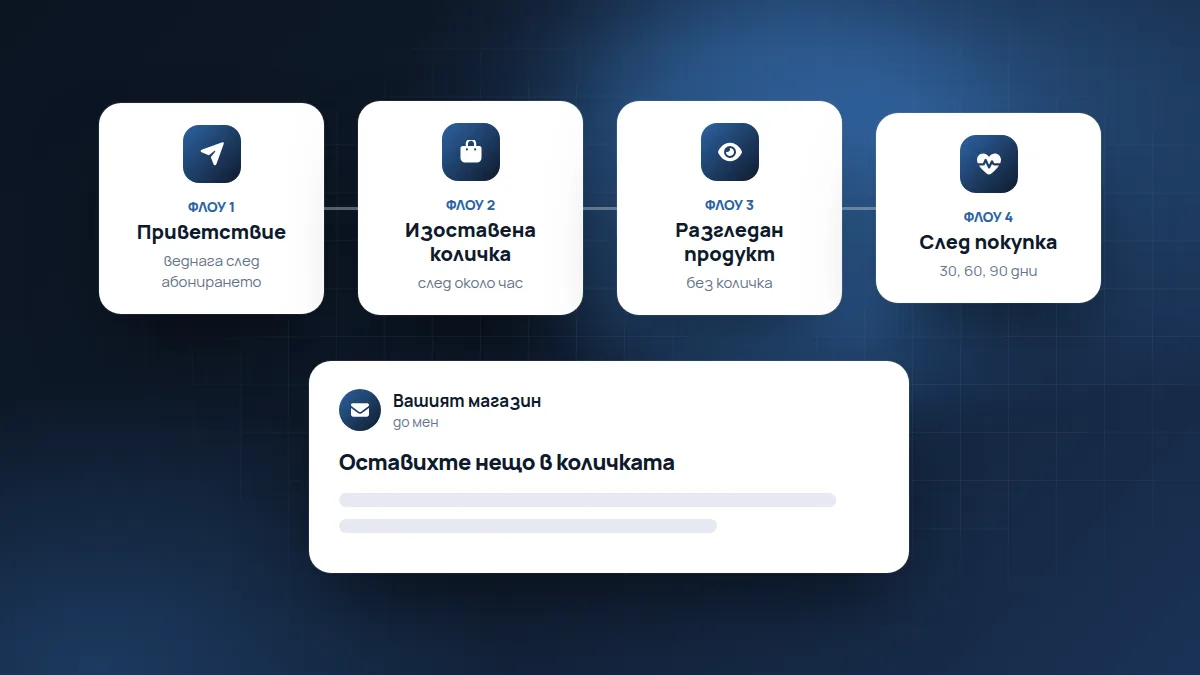
Welcome, abandoned basket, viewed product and post-purchase. Set up once, they work every day.
Holiday campaigns get noticed, but the money in email marketing often comes from “flows”: automatic emails that go out by themselves when a customer does something. At the eCommerce Annual Summit 2026, Mihail Atanasov (Z-Consult) explained which ones are the main ones and how to build them properly.
Their advantage is that they are set up once. After that they work every day, for every customer, at exactly the right moment, without anyone having to remember to send them.
Where subscribers come from
A pop-up for new visitors. It is shown only to people who aren’t yet subscribed and offers something in exchange for the email: a discount, a gift or a useful guide. A good pop-up collects an email from at least 5% of the people who see it. What works: a big close button, one clear field and an offer matched to your average price.
A pop-up field on the product page. For people who closed the pop-up but stay on a product for at least 30 seconds or are about to leave. It offers the same deal.
How not to annoy people
- Don’t show the pop-up as soon as a person opens the website. Let them see what you sell first.
- Don’t show it again to a person who has closed it.
- On a phone, the window mustn’t cover the whole screen without a clear close button. Google doesn’t like such windows, and people like them even less.
- The consent checkbox for marketing emails can’t be pre-ticked.
1. Welcome
It goes out immediately after subscribing. It delivers the promised code, introduces who you are, shows what the products are for, customer reviews and reminds them that the offer expires. Don’t stretch it out over time: interest is greatest in the first few days.
A sample sequence
- Immediately: thanks and the promised code, with a button to the best-selling products.
- After 1–2 days: who you are, where the products come from, what sets you apart. One or two stories or reviews.
- After 3–4 days: a reminder that the code expires if it hasn’t been used.
If the person buys in the meantime, the remaining emails of the series stop and they move to “post-purchase”.
2. Abandoned basket
The person reached the order and stopped. The emails answer their objections (delivery, returns, guarantee) and show exactly the products they left behind. A discount is possible, but not immediately: only in the third email, otherwise you teach customers to wait for a reduction.
Why people abandon the basket
The most common reasons are practical: an unexpected delivery price, a long delivery time, a complicated registration, the lack of a preferred payment method, or simply that the person was interrupted. That’s why the first email is often just a reminder, and the following ones answer the questions:
- After about an hour: “You left something in your basket” with a photo of the product and a button back.
- The next day: delivery, returns, guarantee, reviews of the product.
- After 2–3 days: if you have one, a small incentive such as free delivery or a code.
An abandoned-basket email requires the customer to have left their email before stopping. That’s why it’s good for the email field to be the first one in the order.
3. Viewed product
For people who have looked at a product but haven’t reached the basket. It shows the product they viewed with its benefits. Important: it must not overlap with the other emails, otherwise the customer gets three emails a day.
This email works only for subscribers whom the email tool recognises on the website. That’s why it is weaker than the abandoned basket, but it still brings sales, especially for expensive products that people think about for longer.
4. Post-purchase
The most important one for bringing customers back. It says thank you, explains how to use the product, suggests suitable add-ons, reminds them when it’s time for a refill and collects a review. Unlike the others, here it’s good to spread it over 30, 60 and 90 days, adjusted to the delivery.
A sample sequence
- After delivery: thanks, how to use the product, who to contact with a question.
- After 1–2 weeks: a request for a review, when the customer has already tried the product.
- After about a month: a suitable add-on to what they bought.
- When the product usually runs out: a reminder for a refill.
The timing depends on the product: a face cream runs out in a month or two, shoes are bought once a year.
How to stop them overlapping
If all the flows start at the same time, one person can get a welcome, an abandoned basket and a viewed product in a single day. A rule that helps:
- a purchase stops the welcome, the basket and the viewed product;
- the abandoned basket takes priority over the viewed product;
- no more than one automatic email a day to one person.
Most email tools (Klaviyo, Mailchimp, Brevo, Omnisend and others) have a setting for this.
And campaigns?
The most profitable campaigns are three: a new product, a voucher for a set amount (even as a plain text email) and a big sale once every 3–4 months, for example the brand’s birthday or a “summer Black Friday”.
How to tell whether they work
For each flow, mainly look at one number: how many sales it has brought. Email tools show it directly if they’re connected to the shop. Opens are useful, but they are no longer accurate, because some mailboxes count them automatically.
If a flow brings in little, see where it loses people: in the subject line (few opens), in the content (few clicks) or on the website (clicks without purchases).
Where to start
Write down the 5 most common hesitations customers have before buying and the 5 reasons they buy again. That is the content of the four emails. If you want us to set them up for you, see email marketing and automations.
If you have to choose one, start with the abandoned basket: it is closest to the sale. After that, the welcome and “post-purchase”.
Based on the talk “The customer journey after AI: SEO, content and email marketing” by Mihail Atanasov (Z-Consult) and Martin Zhelyazkov (PROGS Agency) at the eCommerce Annual Summit 2026.
Found this article useful? Share it.